
You’ve already tried three different to-do apps this year. And yet you feel like it’s not quite clicking. Too simple, too complex, or just not complete enough. I’ve now used TickTick daily for six months and can tell you exactly where it excels – and where it falls short.
TickTick: the company
TickTick was developed by Appest Inc., a software company from China that started in 2013. It began as a simple task list app, but grew into a full-fledged productivity tool.
What makes TickTick different? They take the ‘all-in-one’ concept seriously. Where other apps force you to use five different tools (one for tasks, one for habits, one for focus), TickTick puts everything in one package. Whether that’s an advantage? That depends on what you’re looking for.
The company now has millions of users worldwide and continues to actively develop. They listen to feedback, though sometimes that goes slowly. The app is available on literally every platform: web, iOS, Android, Windows, macOS and even Linux. You don’t see that often.
Who is TickTick actually for?
TickTick is ideal for people who want to manage their entire productivity system in one app. Think of freelancers who want to track their projects, daily tasks and personal habits without having to switch between apps.
Students also find what they’re looking for. The combination of task lists for assignments, a calendar view for deadlines, and the Pomodoro timer for focus sessions during exam weeks? That works well.
For whom is it less suitable? If you like minimalist, beautifully designed apps, you’ll probably frown. TickTick’s design feels dated. Not ugly, but not exactly inspiring either. Things 3 users will shudder.
And if you mainly collaborate in teams? Then there are better options. The collaboration features are there, but feel like an afterthought. Asana or ClickUp are much stronger at that.
TickTick features
Let’s look at what you actually get when you open TickTick:
- Voice Input – You can dictate tasks instead of typing. Handy when you’re on the go or your hands are full. The recognition works reasonably well, though you sometimes need to make corrections. Not as advanced as Siri or Google Assistant, but usable.
- Pomodoro Timer – This is where TickTick really excels. The timer is integrated into every task. Start a 25-minute session, work focused, take a break. The app tracks how many Pomodoros you do per day. For people who struggle with focus, this is worth its weight in gold.
- Habit Tracker – Want to exercise daily, drink more water, or read for an hour? Turn it into a habit and check it off when you do it. You see streaks, statistics, and patterns. It motivates you not to break that streak. Simple but effective.
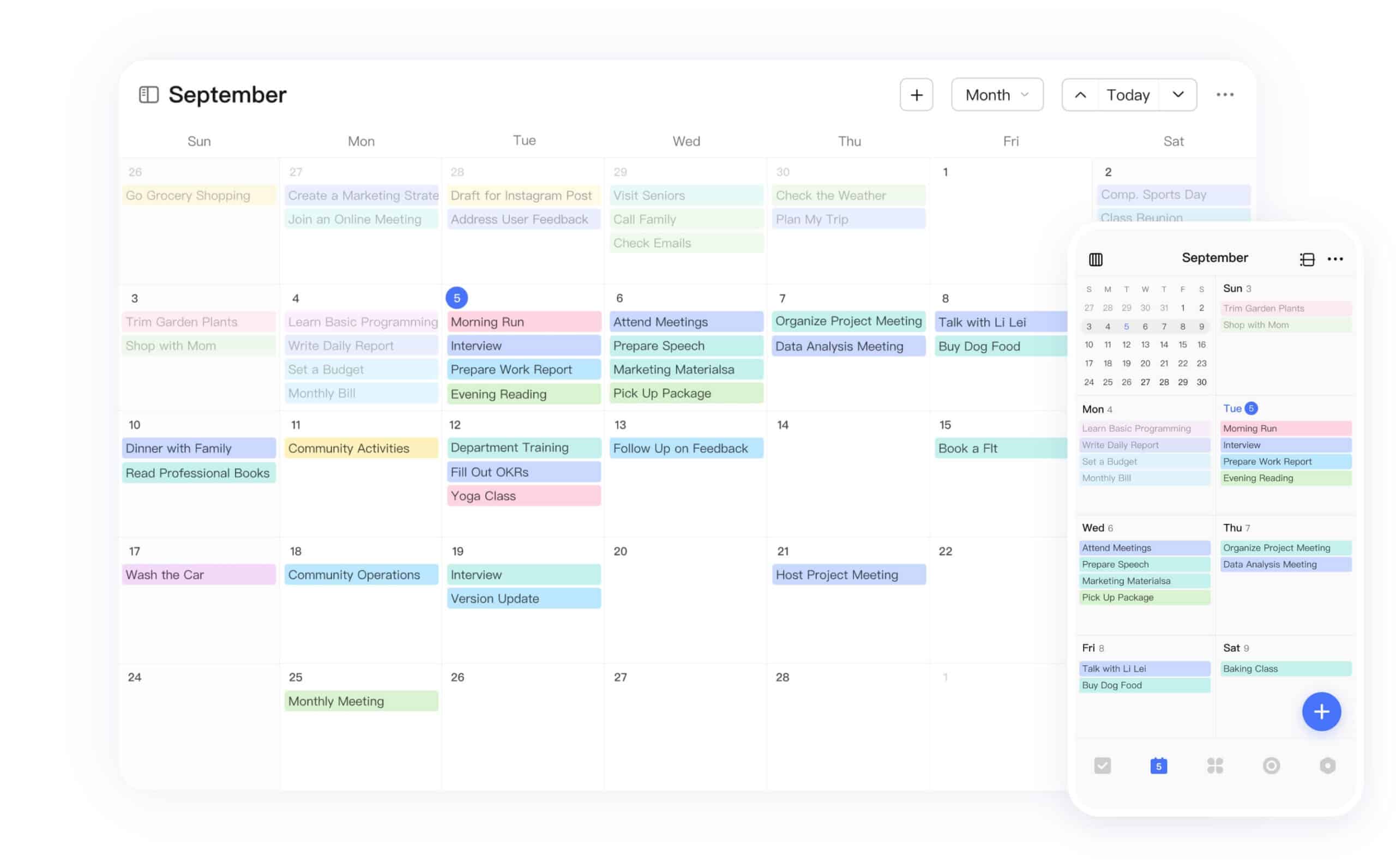
- Calendar View – Here you see your tasks on a timeline. You can drag tasks to specific time slots and plan your day. Time blocking in practice. This is one of the most valued features, especially for people who want to plan their day meticulously.
- Smart Lists – Automatic lists based on filters. All high-priority tasks, or everything due today, or tasks you’ve assigned to a specific project. You don’t have to sort manually, the app does it for you.
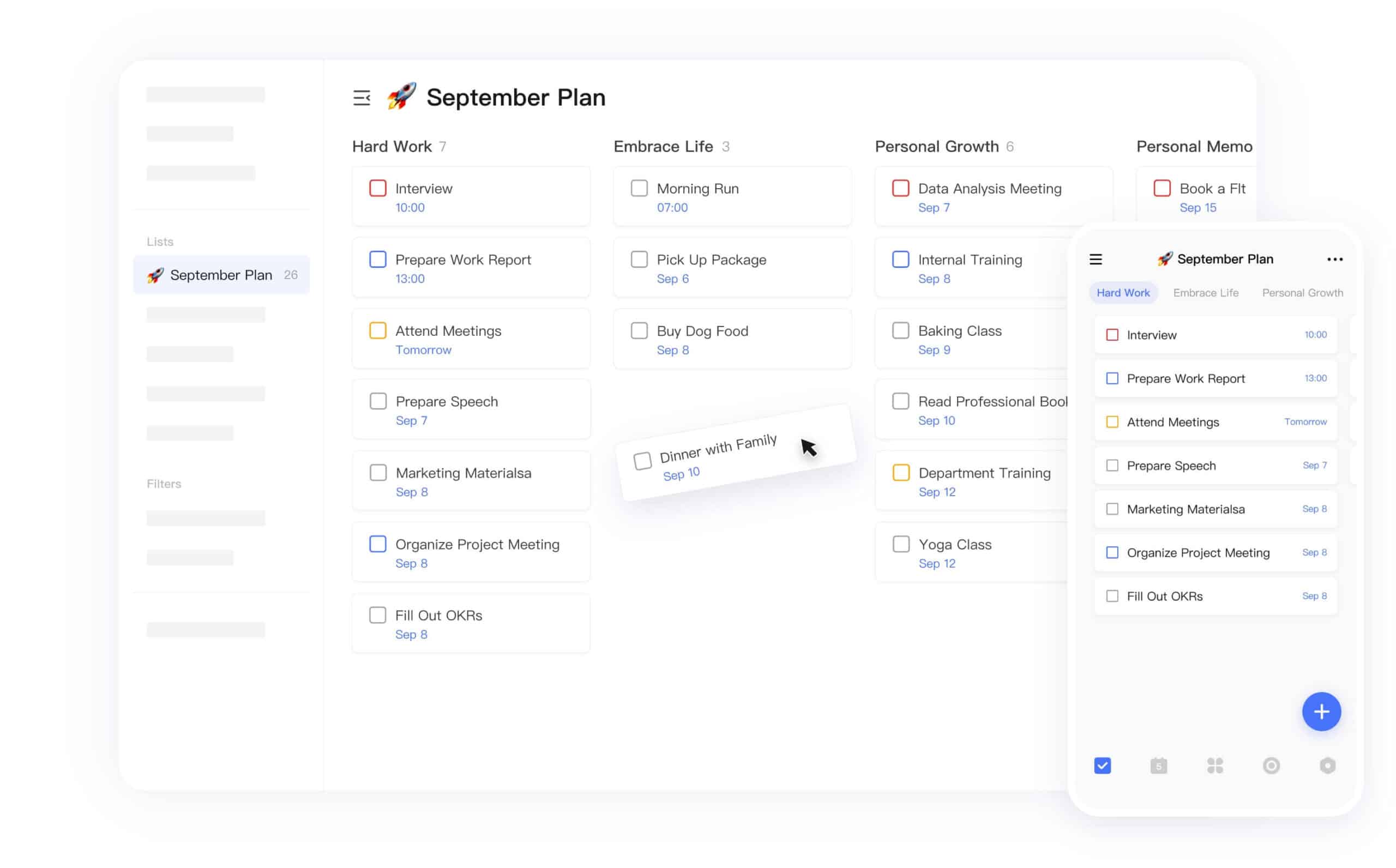
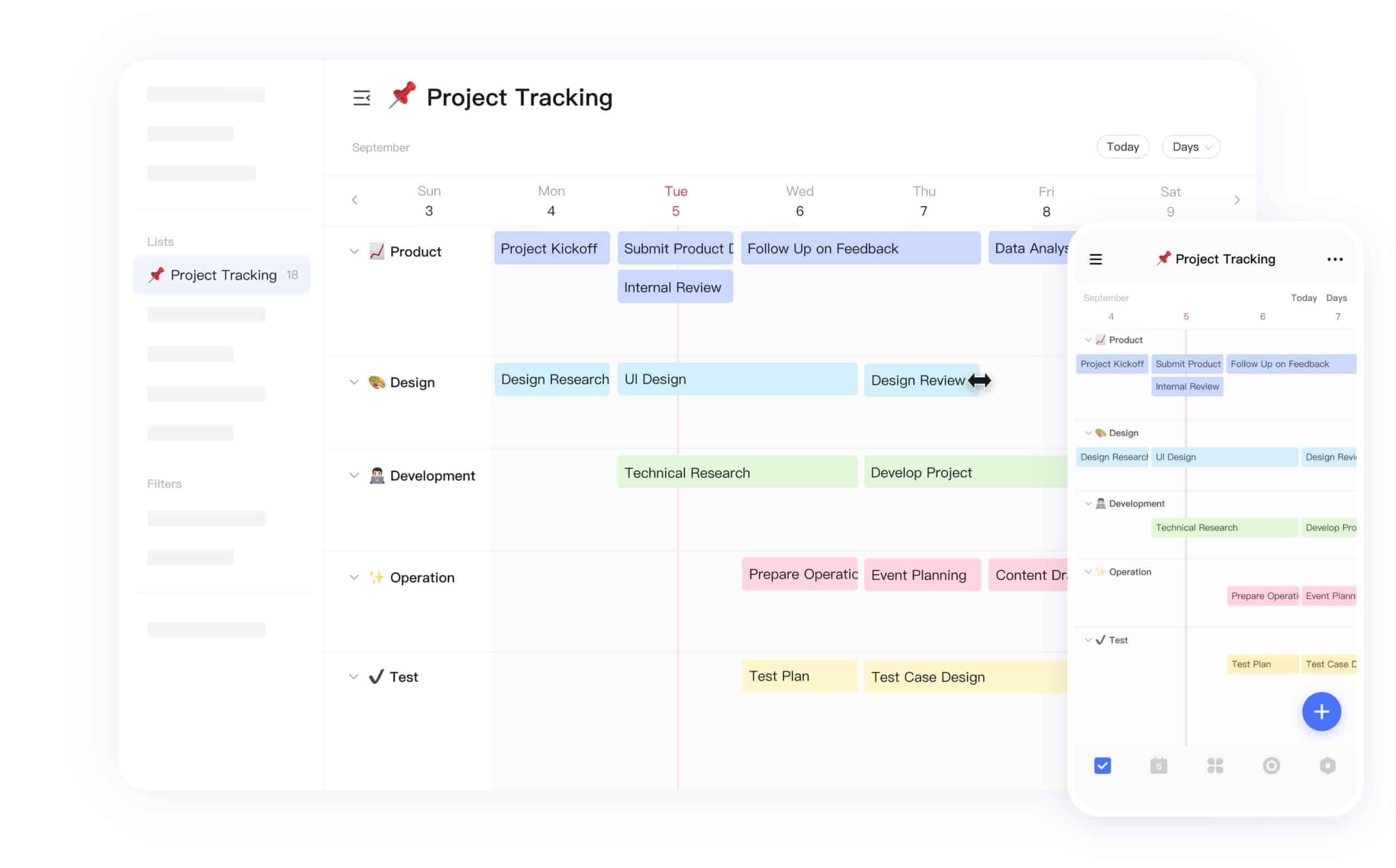
- Kanban View – For visual thinkers. Drag tasks from ‘To do’ to ‘In progress’ to ‘Done’. Works especially well for projects with multiple phases. Think of writing an article: research, first draft, revision, publishing.
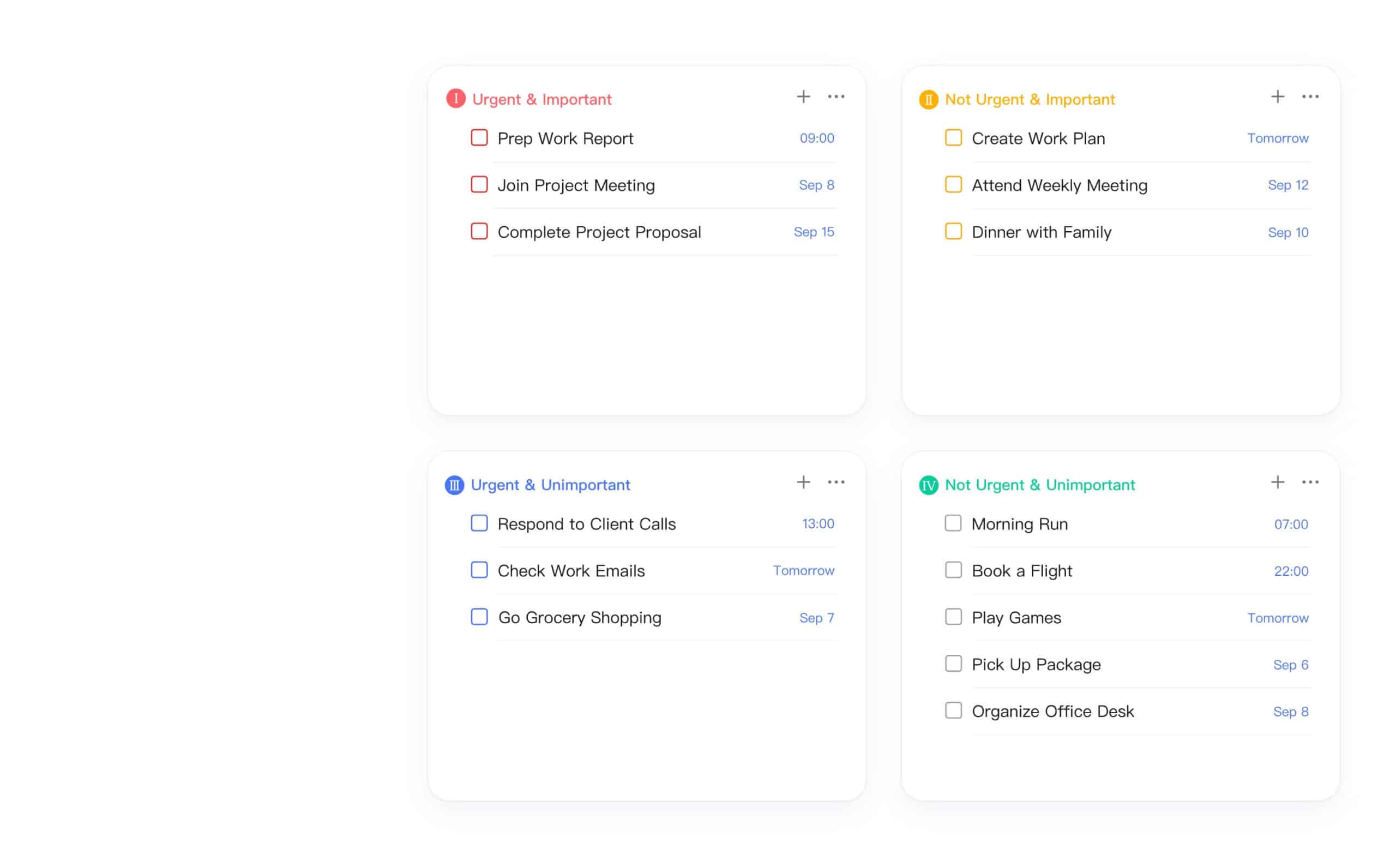
- Eisenhower Matrix – Organize your tasks based on urgency and importance. Urgent and important? Do it now. Important but not urgent? Schedule it. This helps you focus on what matters instead of just reacting to what seems pressing.
- White Noise – Background sounds to help you concentrate. Rain, coffee shop, nature sounds. Not unique, but convenient that it’s integrated. You don’t have to switch to a separate app.
The calendar view deserves extra attention. This is where TickTick distinguishes itself from competitors like Todoist. You don’t just see when something is due, but you can also plan exactly when you’re going to work on it. So not just “this needs to be done Friday”, but “Friday from 2:00 PM to 3:30 PM I’ll work on this”. That difference is bigger than you think.
The Pomodoro timer is also particularly well implemented. You can set how long your focus sessions and breaks last, how many sessions you want to do before taking a longer break, and the app tracks everything. After a week you see patterns: when are you most productive? How many Pomodoros do you average per day? Those insights are valuable.
TickTick pricing
The free version is surprisingly generous. You get up to 9 lists, 99 tasks per list, and 19 subtasks per task. For many people, that’s enough to get started. You can also use the Pomodoro timer and track habits, albeit with limited statistics.
But the limitations feel arbitrary. One attachment per day? That’s just annoying. And no access to calendar views in the free version is a missed opportunity, because that’s exactly where TickTick excels.
Premium costs $ 3.99 per month if you pay monthly. If you go for an annual subscription, you pay $ 35.99 per year, which comes down to $ 3 per month. So you save about $ 12 per year with an annual subscription.
Is it worth it? Compared to Todoist (which costs $ 4 per month with an annual subscription), TickTick is slightly cheaper and offers more features. The calendar view, Pomodoro timer, and habit tracker are included for free. With Todoist, you have to use external integrations for some of those features.
There’s a 7-day free trial. Enough to test whether it fits you, but not so long that you really get used to all the premium features. Smart of them, less convenient for you.
For Dutch users: $ 3 per month is about € 2.80. Not much, but it adds up if you have multiple subscriptions. And you can’t share the subscription with your family, so everyone pays separately.
What should you watch out for?
The interface design is dated. Not broken, but not pretty either. If you’re used to the sleek, minimalist designs of Things 3 or Notion, TickTick feels cluttered. There are many buttons, many options, many menus. Functional? Yes. Inspiring? No.
The synchronization with external calendars is slow. Connect your Google Calendar? Then expect a delay of sometimes up to 15 minutes before changes come through. That’s frustrating if you want to work in real-time. You make an appointment in Google Calendar and only a quarter of an hour later do you see it in TickTick. Not ideal.
The collaboration tools are basic. You can share lists with others and assign tasks, but it feels like a feature that was added later. No comments, no discussions, no real project management capabilities. For personal use, that’s not a problem, but for teams it’s too limited.
Natural Language Processing works mediocrely. With Todoist, you can type “call Jan next Tuesday at 2:00 PM” and the app understands it. With TickTick, you have to manually set the date and time. That takes time and breaks your flow. Small frustration, but if you add dozens of tasks daily, you notice it.
And then the limited integrations. Yes, there are some connections with other apps, but don’t expect a list of 50 options like with Zapier or Make. The integrations that exist do work, but the choice is limited. Do you use many different tools in your workflow? Then it becomes a puzzle.
What do others think?
The overall sentiment is positive. People especially appreciate the all-in-one approach. Finally one app for tasks, habits, and focus instead of three different subscriptions. The calendar view is mentioned time and again as a favorite. Time blocking just works well.
The free version receives a lot of praise. Compared to competitors, TickTick offers more functionality without paying. That makes the threshold to get started low.
But that dated interface keeps coming back in reviews. People don’t necessarily find it ugly, but they do find it old-fashioned. It feels like an app from 2015 that hasn’t really been refreshed since. Functionality over form, but sometimes you just want something to look good.
The slow calendar synchronization irritates many users. If you want to use TickTick as a central hub and import everything from other calendars, you run into delays. That breaks the idea of one central place for everything.
And the natural language processing? People who switch from Todoist really miss that. It feels like a step backward to have to set everything manually. Small things make the difference in daily use.
TickTick alternatives
Not quite right? Here are the alternatives:
- Todoist – Better natural language processing and many more integrations with other apps. Choose this if you want to quickly add tasks with text recognition and use many other apps in your workflow.
- Microsoft To Do – Completely free and simpler, but with fewer features than TickTick. Choose this if you’re already in the Microsoft ecosystem and looking for a simple, free solution without hassle.
- Things 3 – One-time purchase and superior design, but only available for Apple devices. Choose this if you’re an Apple user who loves minimalist design and doesn’t want to pay a subscription.
Frequently asked questions
What is the difference between the free and Premium version?
With Premium you get full calendar views, unlimited lists and tasks, detailed statistics for your habits, and you can collaborate with more people. The free version is limited to 9 lists, 99 tasks per list, and 1 attachment per day. For serious use, you need Premium.
Does TickTick work offline too?
Yes, you can add, edit, and check off tasks offline. As soon as you’re back online, everything syncs automatically. Handy when you’re on the go or working in areas with poor connectivity.
Can I share my subscription with my family?
No, a Premium subscription is linked to one account. You can share lists with others for collaboration, but everyone who wants to use premium features needs their own subscription. Too bad, because family plans would make the price more attractive.
Conclusion
TickTick is the Swiss Army knife of productivity apps. Everything is included, it works on every platform, and the price is fair. For $ 1 per month, you get more than with most competitors.
But it’s not a perfect tool. The design is dated, syncing can be slow, and the natural language processing feels outdated. If you love beautifully designed apps, this won’t make you happy.
Choose TickTick if you want one app for all your productivity needs and functionality matters more to you than aesthetics. The combination of tasks, calendar, habits, and focus timer in one package is powerful. Especially the calendar view and Pomodoro timer make it worthwhile.
Choose against TickTick if you’re looking for a minimalist, beautifully designed app, or if you collaborate a lot in teams. Then there are better options.
Personally? I still use it daily. Not because it’s the prettiest app, but because it works. And in the end, that’s what matters.