Your calendar is full of meetings. Your to-do list is growing faster than you can check things off. And meanwhile, you have three different apps open to keep track of what you need to do when.
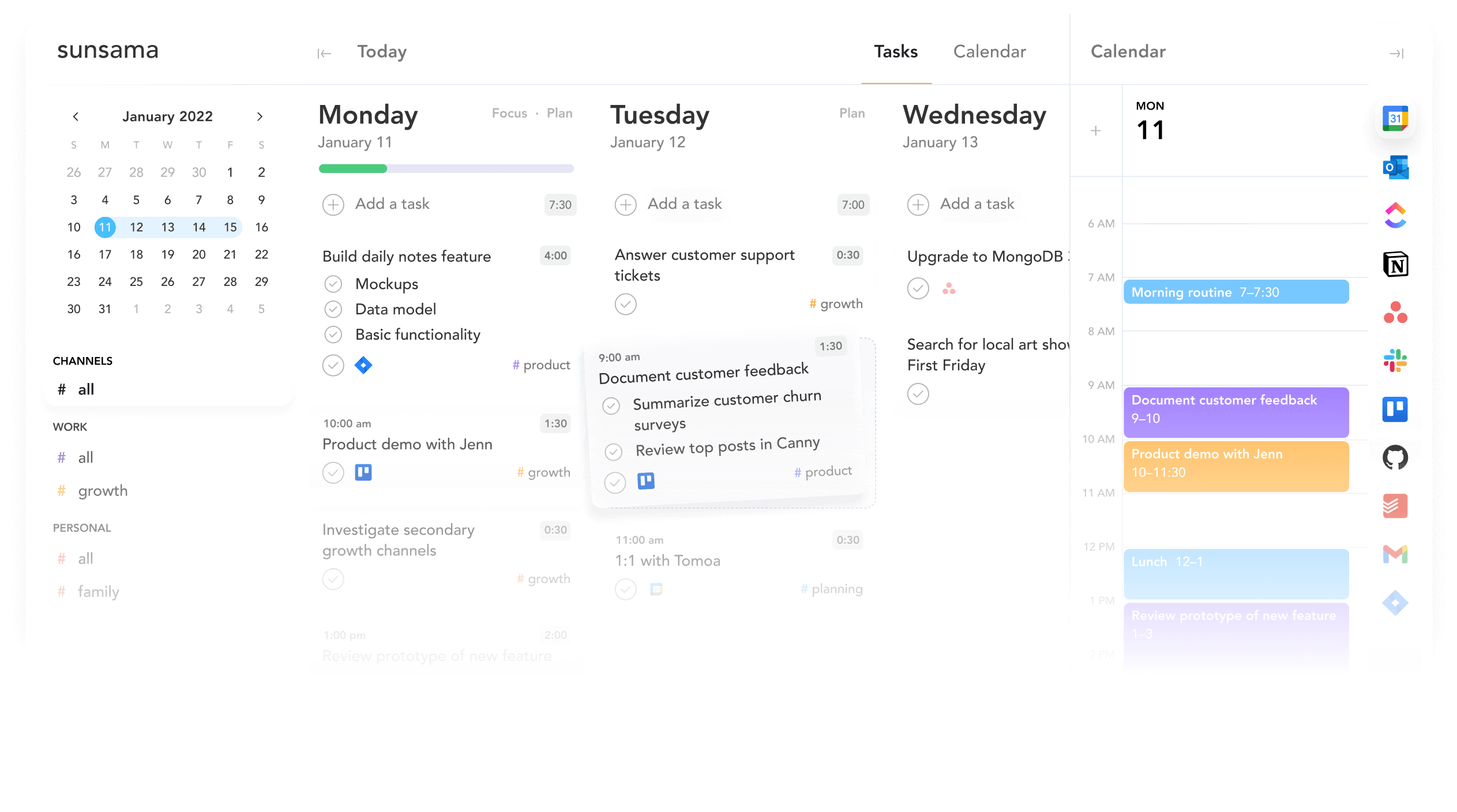
Sound familiar? You’re not alone. Many people struggle with combining their tasks, calendar, and all the tools they use. Sunsama tries to provide a solution by bringing everything together in one daily planner.
But does it really work? And is it worth the price?
Sunsama: the company
Sunsama is built by a small team that believes in mindful productivity. They deliberately focus on quality instead of quantity. Where other apps encourage you to check off as many tasks as possible, Sunsama is all about intentional planning and setting realistic goals.
The company places strong emphasis on security and privacy. They use unbreakable encryption for all your data, which is important because you’ll probably be syncing sensitive information from various work tools.
Sunsama is available on all platforms: web, Windows, macOS, Linux, iOS, and Android. That’s quite unique, as many competitors ignore Linux.
Who is Sunsama for?
Sunsama isn’t for everyone. It’s specifically designed for people who struggle with keeping track of their tasks and calendar. Think of knowledge workers who constantly switch between different tools like Asana, Trello, Jira, Gmail, and their calendar.
The app works particularly well for people with ADHD. Many users report that the daily rituals and focus mode help them tremendously with maintaining structure. The visual warnings when you’re planning too much prevent you from overloading yourself.
Also, if you regularly experience stress or work anxiety, Sunsama can help. The app forces you to plan realistically and consciously wrap up at the end of the day. This prevents work from going on endlessly.
But watch out: if you’re looking for a simple to-do list, Sunsama is probably overkill. And if you need to manage complex projects with multiple team members, there are better options. Sunsama really focuses on personal daily planning.
What can Sunsama do?
Sunsama is packed with features that all revolve around one goal: helping you plan your day consciously and realistically. These are the most important ones:
- Daily planning ritual – Each day you start with a structured ritual where you review and schedule your tasks. The app guides you through this step by step.
- Unified calendar & task view – You see your calendar and tasks in one overview. No more switching between apps to see what you need to do when.
- Timeboxing with drag & drop – Drag tasks to time blocks in your calendar. Sunsama visually warns you when you schedule too much for the available time.
- Focus mode & Pomodoro timer – Put your screen in focus mode to minimize distractions. The built-in Pomodoro timer helps you stay focused. Users report that they can complete work that normally takes four hours in one hour with this.
- Daily shutdown routine – At the end of the day, the app helps you consciously shut down. You reflect on what you’ve accomplished and reschedule unfinished tasks.
- Weekly objectives – Set your most important goals at the beginning of the week. During your daily planning, you see these goals, so you stay focused on what really matters.
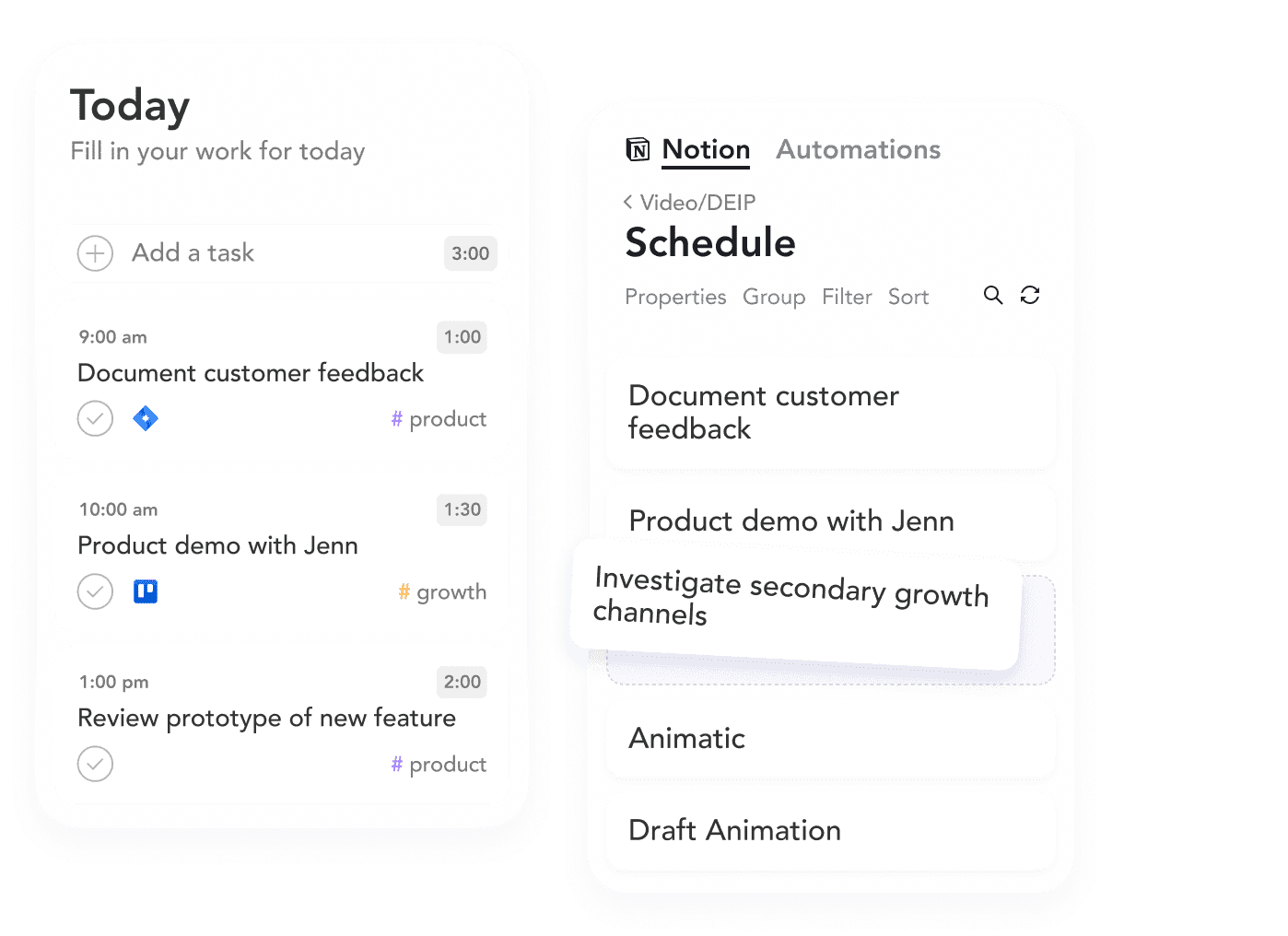
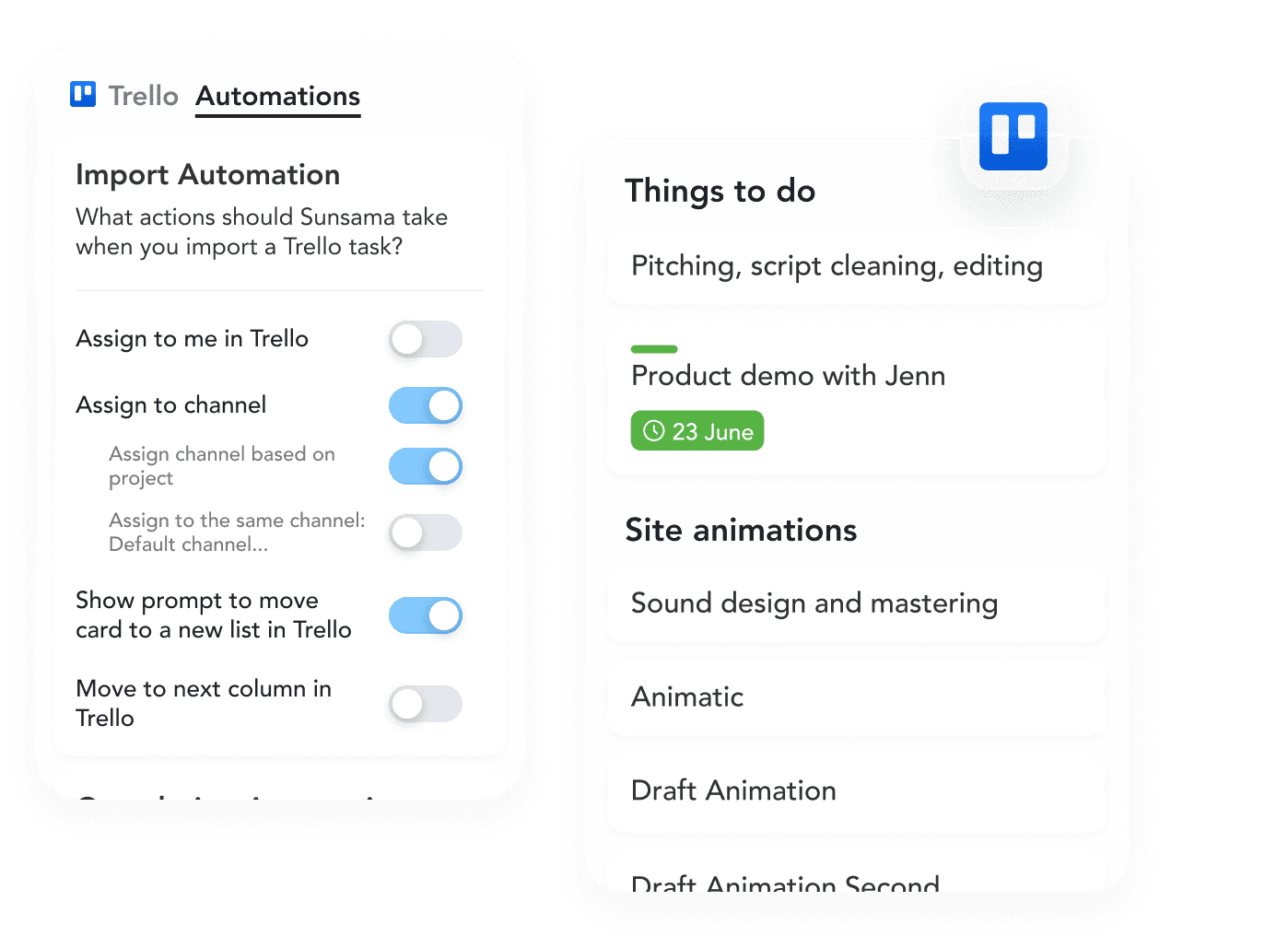
- Integrations – Sunsama pulls in tasks from Asana, Trello, Jira, GitHub, Notion, ClickUp, Todoist and more. You can also convert your Gmail and Outlook emails into tasks. The synchronization works in both directions: what you update in Sunsama is also updated in the original app.
- Channels and contexts – Organize your tasks with channels (like projects) and contexts (like location or energy level). This way you can quickly filter what’s relevant.
- Keyboard shortcuts – The entire app can be operated without a mouse. Once you know the shortcuts, it works incredibly fast.
- AI suggestions – Sunsama learns from your behavior and automatically suggests how long tasks take and which channel they belong to. Not as advanced as Motion, but still helpful.
- Weekly review – At the end of the week, you get a visual overview of where your time went, broken down by priority. This helps tremendously to see if you’re spending time on what you value.
What stands out is that all features revolve around conscious planning. Sunsama doesn’t try to make you do as much as possible, but the right things at the right time.
What does Sunsama cost?
Sunsama doesn’t have a free plan. That’s immediately the biggest criticism you’ll find everywhere. You pay $ 20 per month with a monthly subscription, or $ 16 per month if you pay a year in advance (total $ 192).
There is a free trial period of 14 days. The nice thing is that you don’t have to enter a credit card for this. So you can calmly try out whether the app suits you without automatically starting to pay.
Is it worth the price? That depends on how much value you place on structure and overview. If you constantly have stress from your full calendar and task list, Sunsama can be well worth that $ 20 per month. Many users say they would even pay more because the app has such an impact on their productivity and mental health.
But if you’re a student or just looking for a simple task list, it’s probably too expensive. Then you’re better off looking at alternatives like Todoist or Akiflow.
What should you watch out for?
Sunsama has many fans, but also clear limitations. The biggest criticisms that keep coming up:
The mobile apps are disappointing. Multiple reviewers call them “read-only” or “companion apps”. You can view and check off your tasks, but the full planning experience is really built for desktop. If you work on the go a lot, that’s frustrating.
The price remains a pain point. $ 20 per month is a lot for an individual productivity app. Especially compared to alternatives that do have a free version. You really have to be convinced of the value to keep this up.
Sunsama doesn’t have AI automation like Motion. If you want an app to automatically reschedule your tasks when something comes up, Sunsama isn’t for you. Here you plan everything manually, which is exactly the point, but also takes more time.
The app is missing certain features you might expect. No dedicated habit tracking. No deeper task dependencies within subtasks. No advanced project management features. Sunsama deliberately focuses on daily planning, but that means it can’t do everything.
Updates are relatively slow. Users complain that new features take a long time compared to fast-growing competitors. The team is small and deliberately works at a slower pace, but that can be frustrating if you’re waiting for a specific feature.
Also important: Sunsama works best if you already use other tools. If you don’t have Asana, Trello, Jira or similar apps, you’re missing a big part of the value. The power is precisely in consolidating tasks from different sources.
Sunsama reviews
I’ve looked at and read a number of Sunsama reviews and there are some I’d like to share with you.
1. ToolFinder
ToolFinder gives an extensive review of Sunsama and especially emphasizes the unique character of this app: it’s about quality of tasks, not quantity. The reviewer clearly explains that Sunsama focuses on mindful productivity and preventing burnout, which sets it apart from other task management tools.
The review goes deep into all functionalities: from task management with channels and contexts, to the extensive calendar integrations (Google Calendar, Outlook, iCloud) and the handy task consolidation where you can import tasks from apps like Todoist, Gmail, Trello and Asana. The reviewer is particularly positive about the guided planning feature, focus mode with Pomodoro timer, and the daily rituals that help you start and end consciously. The weekly objectives function is considered very valuable for people who want to zoom out more.
Pros
- Excellent task consolidation from multiple apps (Todoist, Gmail, Trello, Asana, etc.)
- Guided planning with daily and weekly rituals for better work-life balance
- Time blocking with visual warnings when you schedule too many tasks
- Focus mode and Pomodoro timer for productive work
- AI learns from your tasks and automatically suggests duration and category
Cons
- Mobile apps are less intuitive and feel more like a read-only experience
- No powerful AI features like Motion
- Interface is minimalist but may not be visually appealing to everyone
2. Cybernews
Cybernews rates Sunsama as a powerful daily planner that excels in visual overview and integrations. The review strongly emphasizes security and ease of use, highlighting that Sunsama maintains very strict security measures with strong encryption. This makes the app safe for sensitive information from all your integrated apps.
The reviewer especially appreciates the minimalist and intuitive design, the flexibility with apps for all platforms (Windows, macOS, Linux, iOS, Android), and the extensive features like contexts, channels, time blocking and auto-scheduling. They are particularly positive about how Sunsama helps you prioritize your time and mental health. The weekly review feature is seen as a game changer for those who want to increase productivity.
Pros
- Very strong security with unbreakable encryption
- Available on all platforms (web, Windows, Mac, Linux, iOS, Android)
- Time blocking and auto-scheduling help you create realistic planning
- Focus Mode and Pomodoro Mode minimize distractions effectively
- Weekly review encourages reflection and improvement
Cons
- Mobile version feels less intuitive than desktop versions
- Missing dedicated daily habit tracking feature
- Could use deeper task dependencies and progress tracking within subtasks
3. Spencer Scott Pugh
Spencer is an enthusiastic long-term user who has been using Sunsama daily for a year and a half and pays out of pocket. His review is particularly personal and practical, showing how the app has actually changed his life. He emphasizes that Sunsama has helped him gain control over everything happening in his life, especially during his transition from a 9-to-5 job to full-time YouTube.
The reviewer is especially enthusiastic about how you can link your tasks to your life priorities (faith, family, social, work, personal) through tags, and how the weekly review shows you exactly where your time goes. He loves that everything can be controlled via keyboard without a mouse, which greatly speeds up the workflow. The Pomodoro timer has helped him complete tasks that would normally take four hours in one hour by staying focused. He would probably pay even more than the current $ 1 per month because the app is so valuable to him.
Pros
- Fully keyboard-driven for fast workflow without mouse
- Weekly review with visual breakdown of where your time went by priority
- Daily planning and shutdown rituals help you consciously start and stop
- Pomodoro focus mode can drastically increase your productivity (4 hours of work in 1 hour)
- Learns which tasks take how long and suggests this automatically
Cons
- At $ 20 per month relatively expensive for an app
- Sometimes you get logged out (once every few months, possibly Google-related)
Sunsama alternatives
Sunsama not quite right? These are the best alternatives:
- Motion – Choose Motion if you want AI to automatically manage and optimize your calendar. Motion automatically schedules tasks in your calendar based on priority, deadlines, and available time. It’s more powerful in automation, but lacks the mindful planning rituals of Sunsama.
- Akiflow – Go for Akiflow if you want a fast, central hub for all your tasks and calendars without extensive daily reflection. Akiflow is more focused on keyboard shortcuts and quickly collecting tasks from different sources. It feels faster, but less intentional.
- Todoist – Choose Todoist if you’re looking for a simple, powerful to-do list and don’t need a daily planner interface. Todoist does have a free version and is much cheaper, but lacks the deep calendar integration and timeboxing workflow of Sunsama.
Each of these alternatives has a different focus. Motion is best for those who want automation. Akiflow for those who want speed. Todoist for those who want simplicity. Sunsama sits in between with a focus on conscious, intentional planning.
Frequently asked questions
Does Sunsama have a free plan?
No, Sunsama does not have a permanent free plan. There is a 14-day free trial available without requiring a credit card. After the trial period, you pay $ 1 per month or $ 1 per month with an annual subscription.
What tools does Sunsama integrate with?
Sunsama integrates with many popular tools such as Asana, Trello, Jira, GitHub, Notion, ClickUp, Todoist, Gmail, Outlook Calendar and Google Calendar. The integrations work in both directions, so changes in Sunsama are also carried over to the original app.
Does Sunsama work on Linux?
Yes, Sunsama has a desktop application available for Windows, macOS and Linux, in addition to the web version and mobile apps for iOS and Android. That’s quite unique, because many competitors don’t support Linux.
Conclusion
Sunsama is not a regular task list. It’s a daily planner that forces you to plan consciously and realistically. If you struggle with overview, stress, or the feeling that your work is never done, Sunsama can really help.
The power lies in the combination of tasks and calendar in one overview, the daily rituals that provide structure, and the integrations with all the tools you already use. Users are especially enthusiastic about how the app helps them not to over-schedule and to consciously shut down.
But the price is high. $ 1 per month is a lot for an individual productivity app. And the mobile apps are disappointing for those who work on the go a lot. You also miss advanced AI automation like with Motion.
Is it worth it? That depends on how much value you place on structure and peace of mind. If you constantly have stress from your full calendar, Sunsama can pay back that investment many times over. But if you’re looking for a simple task list or have a limited budget, there are cheaper alternatives.
My advice: try the 14-day free trial. You don’t need a credit card, so you risk nothing. After two weeks, you’ll know if the daily rituals and unified overview really work for you.