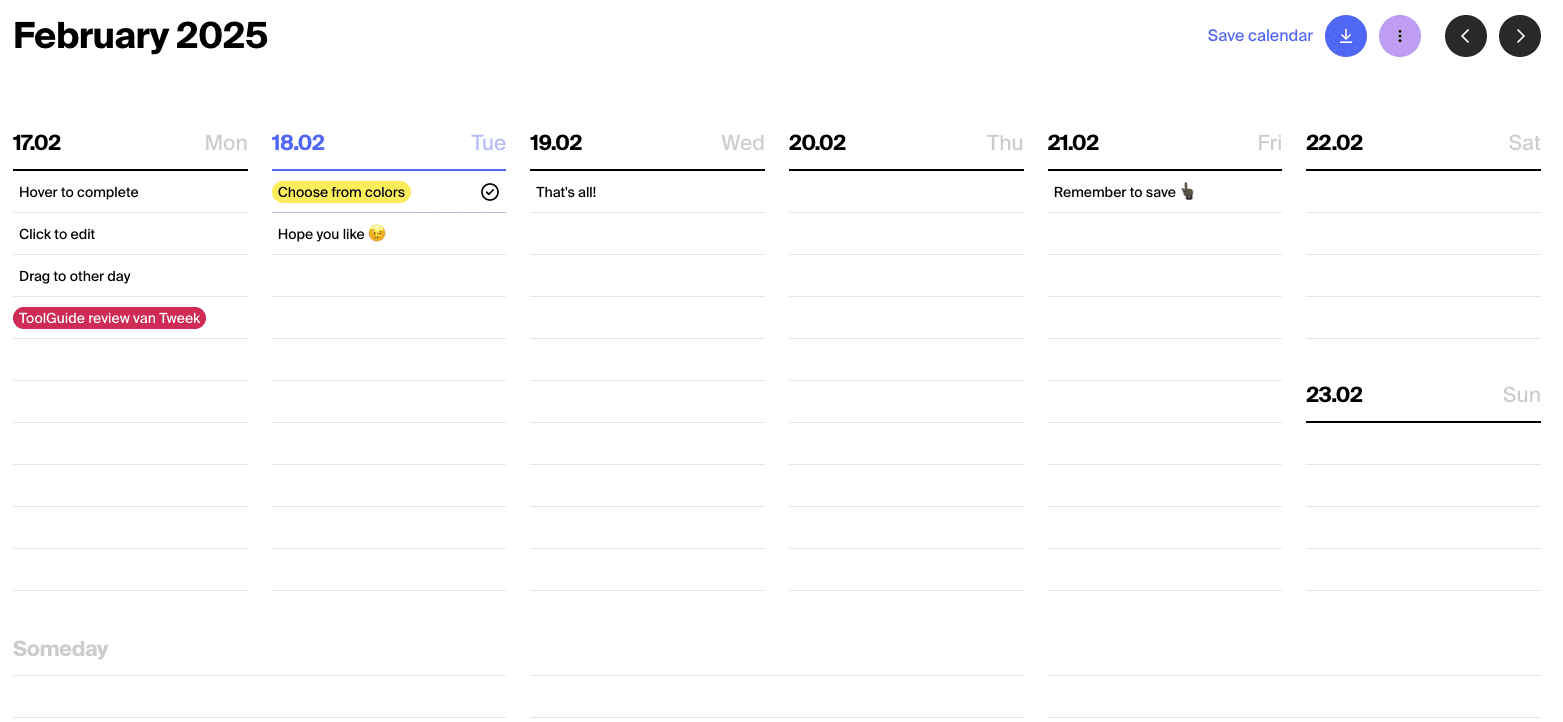
You just want a week overview with your tasks. No fancy project management, no Gantt charts, just a simple overview that feels like pen and paper. Tweek is a minimalist weekly planner that offers exactly that: a digital version of your weekly planner, without unnecessary bells and whistles.
Who is behind Tweek?
Tweek is developed by a European company that focuses on simple productivity tools. The tool is specifically designed for people who want to overview their week without drowning in complex features. The core idea is simple: a digital planner that mimics the experience of a paper agenda, but with the benefits of synchronization between your devices. The company deliberately chooses minimalism instead of feature-bloat.
Who is Tweek for?
Tweek is ideal for minimalists who don’t need extensive project management features. If you’re visually oriented and like to see your week at a glance, this tool fits you. Freelancers who manage their own time without strict hour schedules will find a pleasant balance between structure and flexibility here. Also, people who are allergic to detailed hour planning and prefer to think per day instead of per hour are well suited here.
But Tweek is not for everyone. Large teams collaborating on complex projects are better off looking elsewhere – the tool lacks collaboration features. Do you need detailed hour planning with time blocks from 9:00 to 9:30? Then Tweek becomes too limiting. And those looking for advanced project management with dependencies and resource planning are definitely in the wrong place here.
What can Tweek do?
Tweek deliberately keeps it simple, but does offer the functionality you need for a clear weekly planning. Here are the main capabilities:
- Weekly calendar overview – You see your entire week on one screen, without hourly divisions. Each day is a column where you drag tasks into. It’s like a desk calendar you might have used in the past.
- Drag-and-drop interface – Moving tasks between days is intuitive. Drag a task from Tuesday to Thursday if your schedule changes. No searching through menus, just grab and move.
- Someday list – At the bottom of your week overview is a section for tasks without a concrete date. Ideal for ideas or things you want to do someday, but not this week. This way they stay on your radar without cluttering your weekly schedule.
- Google Calendar and Apple Calendar sync – With a Premium subscription, your appointments from Google or Apple Calendar automatically appear in Tweek. This gives you one overview of both your appointments and your tasks. Note: this only works one-way, from your calendar to Tweek.
- Recurring tasks – You can automatically repeat weekly or monthly tasks, but only if you pay for Premium. Think of weekly groceries or monthly administration.
- Subtasks and notes – You can expand each task with subtasks and additional notes. Useful for tasks that consist of multiple steps. This feature is also behind the paywall.
- Reminders – Set notifications for important tasks so you don’t forget anything. Again, only available in the Premium version.
- Printable templates – You can print your weekly schedule if you also like working with paper. Some people use Tweek digitally for planning and print their week for on the go.
- Dark mode – For those who check their schedule in the evening, there’s a dark mode available. This is also a Premium feature.
- API access – Technically savvy users can connect their tasks and calendars to other tools via the API. The free version has limited API access, Premium users get full access.
The tool works on web, iOS, Android and macOS. There is no native Windows or Linux app, but the web version simply works in your browser on any platform.
What does Tweek cost?
Tweek has a free plan that lets you start without a credit card. You can use a maximum of 2 active calendars and try out the basic functionality. But many useful features such as calendar synchronization, recurring tasks, subtasks and reminders are not included in the free plan. The color options are also limited.
The Premium plan costs 5,99 dollars per month with monthly payment. If you choose an annual subscription, you pay 49,99 dollars per year, which comes down to 4,17 dollars per month. You save about 22 percent with an annual subscription. There is no lifetime deal available.
New users get 14 days free trial for Premium. That gives you enough time to test whether the paid features are worth the investment for your workflow. You can start the trial without paying immediately.
What should you watch out for?
Although Tweek gets a lot of appreciation for its minimalist approach, there are also clear limitations you need to take into account.
The biggest criticism is that basic functionality like recurring tasks and reminders are behind the paywall. For many people, these feel like essential features, not premium extras. If you’re used to free tools like Google Tasks or Apple Reminders, this feels like a step backward.
The tool does not offer the ability for time blocking or hourly schedules. You can assign tasks to a day, but not to a specific time within that day. For people who plan their day in hour-long blocks, this is a dealbreaker. You only see which day, not when on that day.
Subtasks are also only available in Premium. In the free plan, you cannot break tasks down into smaller steps, which significantly limits usability for more complex to-dos. A task like “Launch website” cannot be broken down into concrete action steps without upgrading.
The integrations are limited to Google Calendar and Apple Calendar. There is no connection with other productivity tools like Notion, Todoist, or Slack. For those whose workflow is spread across multiple tools, this means extra manual work.
Some users report that calendar synchronization works one-way or is slow. Events from your Google Calendar do appear in Tweek, but changes in Tweek don’t go back to your calendar. And sometimes it takes a while for new events to appear. The Android widget also receives criticism because it offers limited functionality compared to the full app.
For power users who are used to advanced features like filters, labels, priorities, and project hierarchies, Tweek feels too basic. Some find the price of nearly 6 dollars per month on the high side for what you get in return, especially compared to more extensive alternatives.
Tweek alternatives
If Tweek doesn’t quite fit what you’re looking for, there are various alternatives that offer similar or very different functionality:
- TeuxDeux – Choose this if you’re looking for an even simpler interface. TeuxDeux has a similar minimalist weekly planner approach, but with an even cleaner design and fewer features. Good for those who find Tweek too busy.
- Todoist – Go for this if you need complex projects and natural language processing. Todoist is much more powerful with project hierarchies, filters, labels, and smart date recognition. You type “tomorrow at 3 o’clock” and it understands what you mean.
- Google Calendar – Consider this if you want full calendar functionality for free. It’s more complex than Tweek, but offers hourly schedules, extensive reminders, and unlimited integrations at no cost. However, less suitable as a pure task list.
Frequently asked questions
Here are answers to the most frequently asked questions about Tweek:
Does Tweek have an API?
Yes, Tweek offers API access for both free and premium users. With the API, you can manage tasks and calendars from other applications or scripts. The free version does have limitations on the number of requests, while Premium users get full API access for more extensive integrations.
Can I sync my Google Calendar?
Yes, but only with a Premium subscription. You can connect both Google Calendar and Apple Calendar, after which your appointments automatically appear in Tweek. This works one-way – events from your calendar come to Tweek, but tasks you create in Tweek don’t go back to your calendar.
Is there a desktop app for Windows?
No, Tweek does not have a native Windows application. You can use the tool through your web browser on Windows, which is fully functional. For macOS users with M1 or newer chips, there is an app available through the iPad version that runs on these Macs.
Conclusion
Tweek does exactly what it promises: a simple, visual weekly planner without unnecessary complexity. The design is pleasant and the interface does feel like a digital version of a paper planner. For minimalists who don’t need extensive project management, this is a solid choice.
But the price-quality ratio raises questions. Placing basic functions like recurring tasks and reminders behind a paywall feels unnecessarily restrictive for many users. For nearly 6 dollars per month, you get less functionality than with many cheaper or even free alternatives.
Choose Tweek if you primarily value aesthetics and simplicity, and you’re willing to pay for that experience. If you have a limited budget or want more functionality for your money, then Todoist or even Google Calendar are better options. In any case, try the free 14-day trial to see if the minimalist approach suits you.